










Fraud Blocker
pixPix Weddingwedding
QR code wedding photos across Canada

Wedding Photo Sharing in Canada

One QR code on the tables, and every guest photo from your Canadian wedding lands in one private album. Guests scan with the phone camera and upload from the browser, no app and no account. Plans are one-time and shown in Canadian dollars.

Start Your Free Album

20 guest uploads free, no card needed

01Wedding QR code for photos

What it costs and asks of guests in Canada

A wedding QR code for photos costs nothing to try in Canada: the free plan takes 20 guest uploads and asks for no card. For the whole guest list, one payment in Canadian dollars opens the album to every guest, with no cap on photos or videos and every file kept in original quality, with no subscription and no renewal. On the guest side it is a camera scan and a browser tab. No app, no account, no password.

What changes at a Canadian wedding is the detail around it: prices in CAD, a sign that speaks English and French, lake and mountain venues where signal comes and goes, and albums that follow the party across a whole weekend. The sections below take them one at a time.

Free to try20 uploads

No card needed to set up the album and QR code.

Paid plans in CADC$67 to C$122

One-time, no subscription. Canadian visitors see and pay CAD.

Upload window3 to 12 months

Counted from the wedding date, depending on the plan.

02No app, no account

How guests upload wedding photos from a QR code

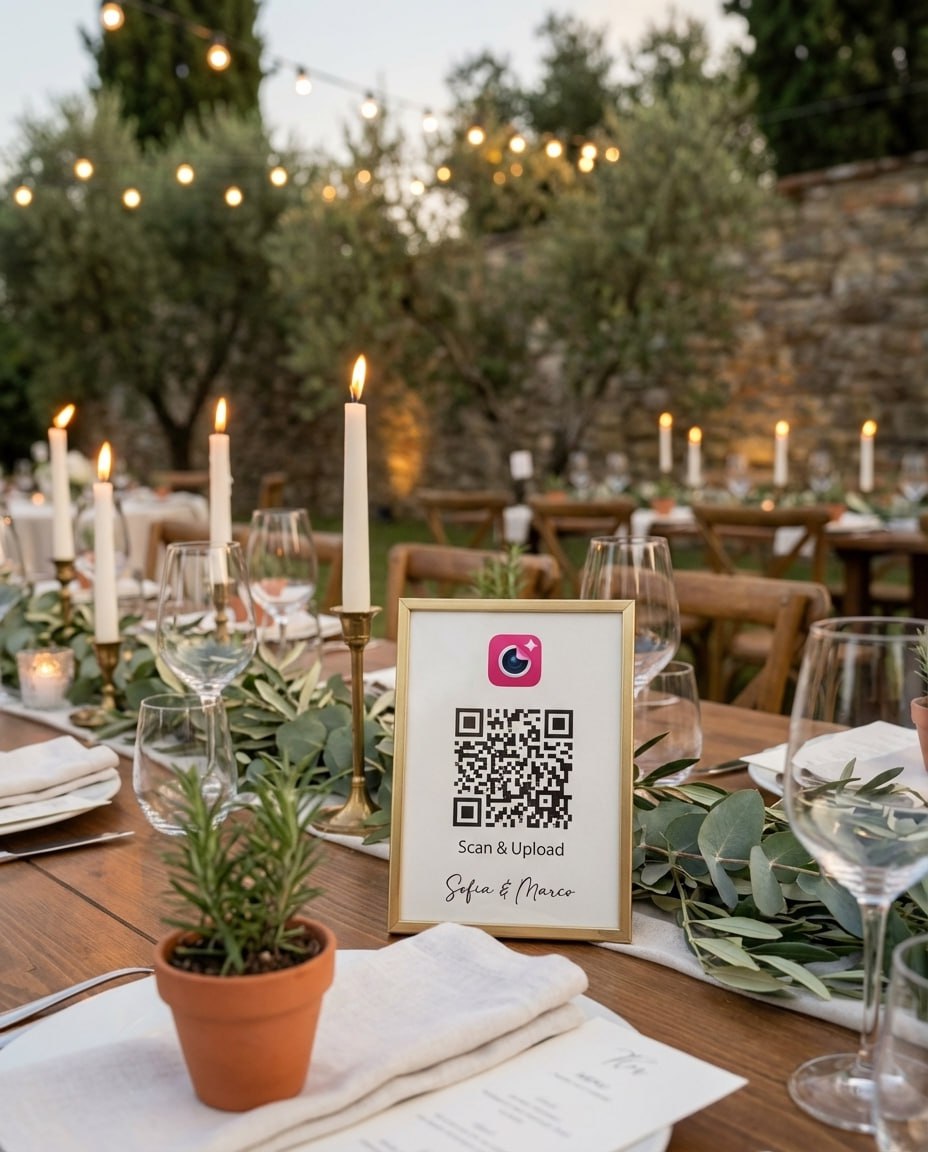
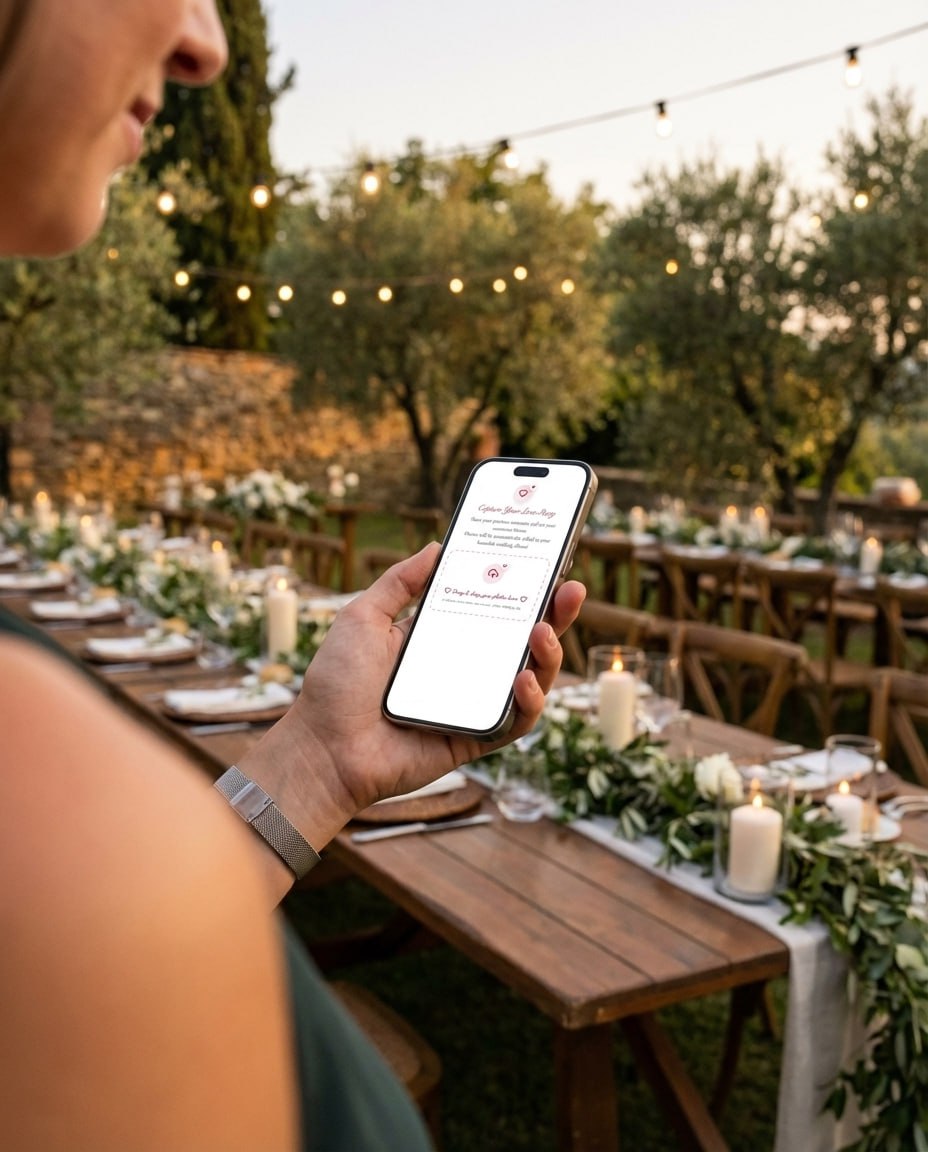
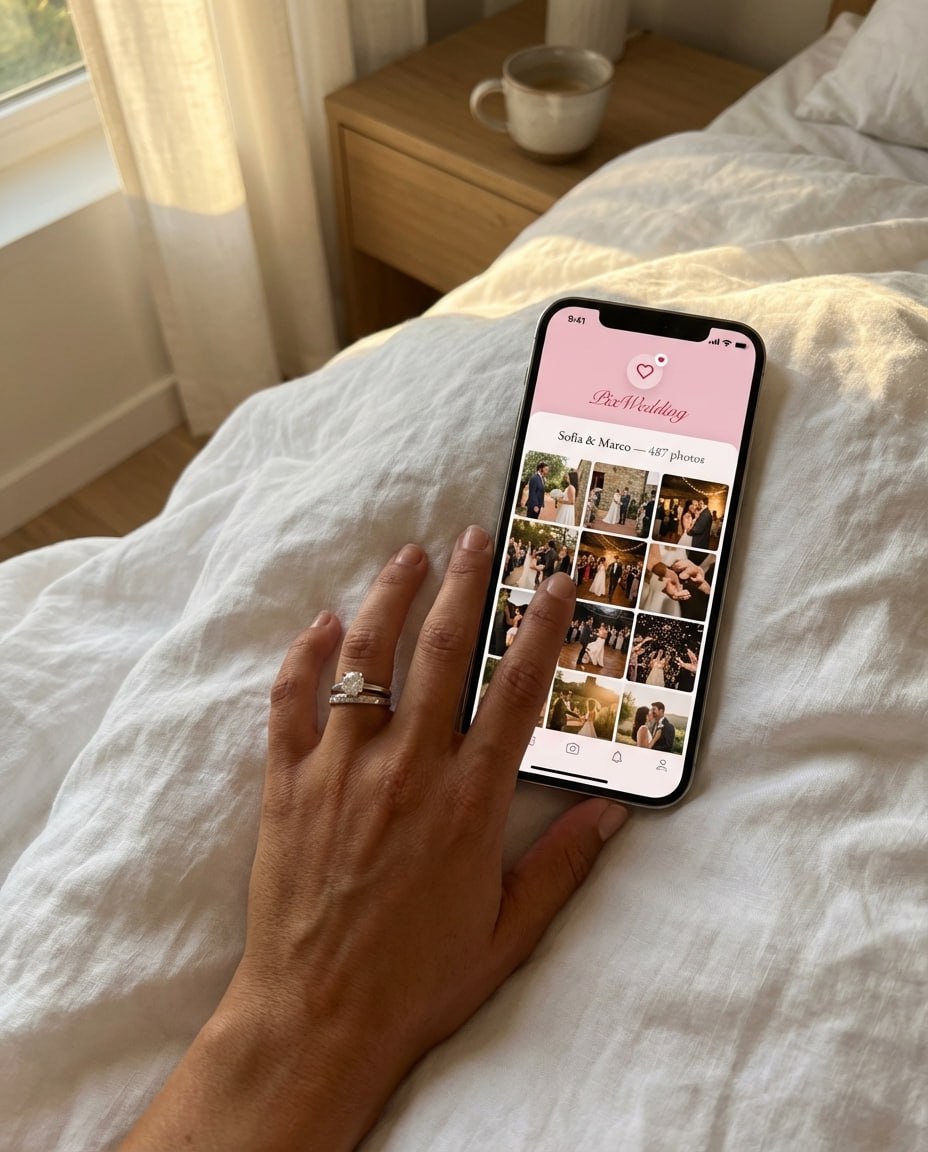
These are real Pix Wedding photos: the sign on the table, the scan, and the album the next morning.

Pix Wedding QR code sign on a wedding reception table
1

Put the QR sign where guests pause

Print the code on a welcome sign, table cards or a bar card. Starter and up include 48 printable QR designs as PNG or PDF.

Wedding guest scanning the QR code with a phone camera
2

Guests scan with the phone camera

The code opens an upload page in the browser. No app store, no account, no password, on iPhone or Android.

Couple looking through the shared wedding album the morning after
3

Wake up to one shared album

Every photo and video lands in your private album in original quality. Download all of it as a ZIP whenever you want.

Start Collecting Memories Today

Set up your album and QR code in a few minutes. 20 guest uploads free, no card, then one payment in CAD.

From Mom

From Mom

Point your camera

Scan to join the album

No app, no account

9:41

UPLOADING

Saving your moment

9:41

THE ALBUM

Emma & Jack

June 21, 2026

647 photos · 95 guests

AllMomentsMine
Guest photo 1
★
Guest photo 2
Guest photo 4
Guest photo 5
Guest photo 6
Guest photo 7
Guest photo 8
Guest photo 9
Guest photo 10
Add photosShare your moments

SCAN TO TRY

pix.wedding/
your-wedding

PRICING FOR CANADIAN WEDDINGS

One payment for the whole wedding. No subscription.

Start with 20 guest uploads free, no card. Canadian visitors see every plan in Canadian dollars at checkout.

Starter
$74$49one-time

For collecting every original

Unlimited photos and videos from every guest

No guest cap, invite the whole family
Full original quality, nothing compressed
Guests scan a QR code, no app to install
Film roll mode: shots stay hidden until your revealNEW
Printable QR sign designs for the tables

Uploads stay open 3 months after the wedding
6 months of storage + one-click ZIP

Chosen by most couples
Standard
$89$59one-time

Most couples pick this

Everything in Starter
Live slideshow on the venue screen
Voice messages and guest names on every upload
Photo missions with a live leaderboardNEW
Separate upload link for your photographerNEW
Up to 6 sub-albums (ceremony, reception and more)
Script and serif fonts for your album
Uploads open 6 months, 1 year of storage

One-time payment, no subscription

Pro
$133$89one-time

For big guest lists

Everything in Standard
AI selfie search: guests find every photo of themselvesNEW
Extra admins for your planner or family
Your own custom domain for the album
Priority support
Uploads open 1 year, 2 years of storage

One payment. Yours to keep. No subscription. No renewals. No surprise charges.

Secure checkout. Polar, Apple Pay, Google Pay.

Money-back guarantee: if your guests never upload a single photo, you get 100% back. See how it works

03Sharing photos at a wedding

QR album, shared album, group chat or disposable cameras?

Most Canadian couples weigh the same four ways of collecting guest photos. Here is what each one asks of your guests and where it falls short.

Our pickPix Wedding QR album

Guests scan one QR code and upload original-quality photos and videos from the browser, with no app and no account. One album, one ZIP, and plans shown in CAD from C$67 once.

MethodWhat guests needAll in one place?The catchCost
Pix Wedding QR albumOur pick
The camera app and a browser tab. No download, no account.Yes, one album with a ZIP downloadGuests need signal or wifi when they upload, which can wait until after the wedding.Free for 20 uploads, then C$67 to C$122 once
Google Photos shared albumA Google account to join the album and add photos. Anyone with the link can view.Yes, for guests who joinGuests who will not sign in to Google have no way to add their shots.Free, within Google storage
iCloud Shared AlbumsAn Apple Account on an Apple device. Apple says guests can join and add photos on the web without one on its newest software.Yes, for guests who joinOn Apple software version 26 or earlier, shared photos drop to 2048 pixels on the long edge and videos to 720p.Free, within iCloud storage
Group chatThe same chat app, and someone adding every guest to the chat.No, photos sit between messagesSomeone has to scroll back and save the photos one by one.Free
Disposable camerasNothing, a camera sits on each table.Only after the film is developedA fixed number of shots per camera, no video, and a wait for developing.Cameras plus developing

Google Photos and iCloud rows checked September 2026 on Google Photos Help and Apple Support (Shared Albums, Shared Albums limits). Pix Wedding figures come from our own plan pages.

Comparing photo sharing apps instead of methods? Our best wedding photo sharing app for Canada guide lines up the apps side by side, and the Guestpix alternative page covers that one in detail.

04Live album demo

What guests see when they scan a wedding photo QR code

A real Pix Wedding demo album: a guest scans the code, uploads from the browser, and the photo shows up in the album a moment later. This is what your guests see.

Try it with your own album
05Bilingual wedding QR sign

Photo sign wording in English and French

In Montreal, Quebec City, Ottawa or anywhere with family on both sides of the language line, guests read the sign before they scan. Copy these lines onto your welcome sign or table cards.

English

Share your photos with us

Scan this code with your phone camera.

No app, no account. Upload as many as you like.

Français

Partagez vos photos avec nous

Scannez ce code avec l'appareil photo de votre téléphone.

Aucune application, aucun compte. Ajoutez-en autant que vous voulez.

Straight answer: the upload page follows each guest's phone language. A phone set to French opens it in French, an English phone in English, and it also comes in German, Spanish, Italian, Dutch and Turkish. The sign still needs both languages, because guests read it before they scan. The page itself is short: choose photos, tap upload.

06Muskoka, Banff and lake venues

Cottage and mountain weddings: uploads wait for the signal

Guests need signal or wifi at the moment they upload, not at the moment they take the photo. At a lake in Muskoka or a lodge near Banff, that changes how you plan. Here is the timeline that keeps the album complete.

1Venue visit

Check the bars before you book the layout

Walk the dock, the lodge terrace and the tent area with your phone. If only the main building has wifi, put the network name and password on the QR sign.

2Wedding day

Guests with signal upload live

Anyone connected sends photos straight to the album. Guests without signal keep shooting, the photos wait on their phones.

3Drive home

Back in range, the uploads start

The QR link keeps working after the party. Guests open it again from their browser history or the sign photo they took.

4Weeks after

Send the link once more

A short thank-you text or email with the album link catches the late uploaders. The upload link stays live 3 months on Starter, 6 on Standard and 12 on Pro after the wedding date.

The live slideshow on Standard shows new uploads as they arrive, so the screen at the venue needs a connection too.
07Wedding weekend photo albums

One event, a separate album for every part of it

Destination weddings in Whistler, Niagara-on-the-Lake or on a lake often run from Friday to Sunday. Standard includes up to 6 sub-albums, so each part of the weekend keeps its own photos under one QR code.

Welcome night

Friday drinks at the lodge or the cottage dock, often the only night everyone is relaxed.

Ceremony

Guests keep phones down during the vows, then upload the confetti walk and the family shots.

Reception

Speeches, first dance and the dance floor, the part guests film the most.

Day-after brunch

The quiet goodbye photos that usually never leave a guest's camera roll.

Pro adds AI selfie search, so each guest can find the photos they are in across the whole weekend. Face data stays private and is deleted with the event.

09Wedding QR code signs

Eight spots guests scan, from the coat check to the bar

Codes get scanned where guests stand still with a phone in hand. Work through this list with your venue floor plan.

  1. 1Put one large sign at the entrance or the guest book table, where everyone stops at least once.
  2. 2Place a small card on every dinner table, facing the chairs, so guests can scan without getting up.
  3. 3Add a card at the bar. People wait there with a phone in hand.
  4. 4For a fall or winter wedding, put a card at the coat check too, where guests queue on the way in and out.
  5. 5At a cottage or lodge venue with patchy signal, print the wifi name and password under the code.
  6. 6If the ceremony and reception are in different buildings, give each one its own sign.
  7. 7Ask your MC or DJ to mention the code once, after dinner, in both languages if your crowd is bilingual.
  8. 8Scan the printed code with both an iPhone and an Android under the reception lights before the day.
Need signs? Paid plans include 48 printable QR designs, or make stickers with the free QR sticker designer.
10Wedding photo app for guests

When a QR album fits, and when it does not

A good fit when

  • You want guest photos and videos in original quality, not screenshots from a group chat.
  • Your guest list mixes ages and phones, and you do not want anyone installing an app.
  • Guests travel in for the weekend and will upload over days, not minutes.
  • You want the whole album as a ZIP you keep after the plan ends.
  • Part of your family reads French. Guests whose phone is set to French get the upload page in French.

Probably not for you when

  • Your venue has no signal and no wifi at all, and guests will not upload later from home.
  • You only want the photographer's gallery and no guest photos.
  • Everyone on your list already shares in one family album and is happy with it.

Sounds like your wedding? Make the album now and test the QR code on your own phone first.

Start Your Free Album
11Guest photo mistakes

Three slips that split the album in two

The signal, sign and upload-window points are covered above. These three are about what guests hear and where the link lives.

The MC tells guests to "download our app"

Some guests will search the app store, find nothing and give up. The words that work are "scan the code on your table and upload", said once after dinner.

A family group chat running as a second album

Half the photos end up in the album and half in the chat, and the chat copies are the ones nobody remembers to save. Post the QR link in the chat instead.

The code printed only in the program

Programs get left on chairs after the ceremony, so a code printed only there is gone by dinner. Treat the program as a bonus and the spots above as the plan.

Tip: save the album link in your phone notes so the thank-you message is one paste away.
12Canadian wedding planning

Licence, budget and photo sharing abroad

Photographer upload link

Guest photos and your photographer's gallery, side by side

Your photographer covers the portraits, the vows and the first dance. Guests catch everything around them: the next table over, the cousins on the dock, the last hour on the dance floor. Left alone, the two sets end up in different places, the professional gallery after the wedding and the guest shots scattered across a hundred camera rolls.

On Standard and Pro you can send your photographer a private upload link. Their files sit in their own photographer album, right next to the guest uploads in one gallery, and they do not need an account. Sub-albums keep the ceremony, the reception and the rest of the weekend apart, so one link holds the whole story.

ZIP download and storage

Keeping the wedding album once the uploads stop

Every paid plan includes a ZIP download of the full album in original quality, and you can download it at any point, not only at the end. The album stays stored for half a year on Starter, a year on Standard and two years on Pro, so save a copy to your own computer or drive before the storage window ends. The ZIP is yours to keep.

A simple rhythm works well: one ZIP after the honeymoon, when most guests have uploaded, and a final one when the upload window closes.

Photo sharing FAQ, Canada

Paying in CAD, French guests and signal: your questions

What Canadian couples ask before they print the code: CAD checkout, late uploads from out of province, French-speaking guests and Guestpix.

You create an album on Pix Wedding and print its QR code on signs or table cards. Guests scan it with the phone camera, a browser page opens, and their photos and videos go straight to your album. There is no app to install and no account to create, on iPhone or Android.

Yes. The free plan gives you a real album and QR code that takes 20 guest uploads, card-free, so you can scan it with your wedding party and watch the album fill before you commit. When you are ready for the full guest list, a one-time plan in CAD opens it up to every guest and adds unlimited photos and videos, the album ZIP, film roll mode and ready-to-print sign designs.

Yes. Checkout runs through Polar and accepts cards, Apple Pay and Google Pay. Canadian visitors see plan prices in Canadian dollars: C$67 for Starter, C$81 for Standard and C$122 for Pro, each a one-time payment.

Yes. The upload page follows the language of each guest's phone, so a phone set to French opens it in French and an English phone opens it in English. It also comes in German, Spanish, Italian, Dutch and Turkish. For a bilingual wedding, put the sign instructions in English and French too, since guests read the sign before they scan.

Photos stay on guests' phones until they reconnect. Guests open the same link later, on the drive home or back in the city, and upload then. One reminder message a few days after the wedding usually brings in the late ones.

Yes. The QR code opens a normal web link, so it works from any province or country. Starter keeps the upload link live for 3 months after the wedding date, Standard for 6 and Pro for a full year, and on every plan the album stays stored longer than the upload window. The full ZIP download is there whenever you want it.

Yes, on Standard and Pro. Standard includes up to 6 sub-albums, so a welcome night, the ceremony, the reception and a brunch can each have their own space inside one event.

We keep a side-by-side on our Guestpix alternative page, with Guestpix pricing checked on its own site. On Pix Wedding, guests upload from the browser with no app, and Canadian couples pay one-time in CAD. Our Canada app roundup puts the other options side by side.

Ready to Collect Every Memory?

One QR code, browser upload, no app. Start with 20 guest uploads free, then one payment in CAD.

Wedding Photo Sharing Canada | QR Code Guest Upload, No App Needed


