Wedding Photo Scavenger Hunt: 40+ Fun Challenges for Your Guests
43 wedding photo scavenger hunt challenges in six categories, 20 more on a free printable card, plus card wording, timing and judging tips.
8 min readUpdated Sep 24, 2026Pix Wedding Team
The short version
A wedding photo scavenger hunt gives your guests a list of fun photo challenges to complete during the celebration: capture the flower girl doing something cute, photograph the best man during his speech, snap a selfie with someone you just met. Guests use their own phones. Pick 15 to 25 challenges, print them on a card with one QR code to your shared album, have the MC announce the game at dinner and offer a small prize.
143 Wedding Photo Challenge Ideas for Guests, by Category
Every idea below is a photo challenge guests can shoot on their own phone. There are 43 of them in six categories: pick your favorites from each, or skip to the ready-made 20-challenge card further down.
These challenges catch the unscripted moments nobody could stage, from the ceremony tears to the last hug of the night.
1Catch someone wiping away happy tears during the ceremony
2Photograph a candid laugh between two guests
3Capture the couple looking at each other when they think nobody is watching
4Snap a photo of a guest hugging the bride or groom
5Photograph the oldest guest at the wedding
6Capture the youngest guest doing something adorable
7Photograph someone checking themselves out in a mirror or phone screen
8Catch a guest sneaking a bite of food before dinner is served
Romantic and Couple-Focused Challenges
7 challenges, ceremony to first dance
Moments between the two of you, seen from the guests' seats. Drop the ceremony ones if you are planning an unplugged ceremony.
9Photograph the couple's first look at each other (if public)
10Capture the first kiss from a guest perspective
11Snap the couple holding hands during dinner
12Photograph the ring exchange from your seat
13Capture the couple walking away together (from behind)
14Photograph the couple dancing their first dance
15Snap a selfie with both the bride and groom in the same photo
Dance Floor and Party Challenges
8 challenges, after dinner
Save these for when the music starts and the floor fills up. They give the album its most energetic shots.
16Catch someone pulling off an impressive dance move
17Photograph a group of people doing a line dance
18Capture the wildest dancer on the floor
19Snap a photo of someone singing along to the music
20Photograph the DJ or band in action
21Capture someone doing the robot, the worm, or a dip
22Photograph the dance floor when it is completely packed
23Snap someone who clearly did not want to dance but got pulled in
Detail and Decor Challenges
7 challenges, cocktail hour and dinner
Easy wins early in the evening, before the room gets busy. Good for guests who prefer to stay behind the camera.
24Photograph your table centerpiece up close
25Capture the wedding cake before it is cut
26Snap a photo of the venue from the farthest point away
27Photograph the smallest detail you can find (a button, a flower petal, a monogram)
28Capture the sunset or sky from the venue
29Photograph the getaway car or send-off setup
30Snap a creative photo of the wedding rings
Funny and Silly Challenges
7 challenges, all evening
Light-hearted shots that make the album fun to scroll through later. Keep them kind, nobody should end up as the joke.
31Take a selfie making your best 'ugly cry' face
32Photograph someone who has kicked off their shoes
33Capture a guest balancing something on their head
34Snap a photo of the most creative outfit or accessory
35Photograph someone photobombing another photo
36Capture a guest taking a nap or resting their eyes
37Snap someone going back for seconds (or thirds) at the buffet
Social and People-Focused Challenges
6 challenges, dinner and speeches
Challenges that get guests talking to each other, which helps plus-ones and anyone who only knows the couple.
38Take a selfie with someone you just met tonight
39Photograph a table group raising their glasses for a toast
40Capture three generations in one photo
41Snap a photo of the wedding party all together (unofficial shot)
42Photograph someone giving a toast or speech
43Capture two people from different friend groups becoming friends
2Free Printable Wedding Photo Scavenger Hunt List: 20 More Challenges on One Card
None of these 20 appear in the lists above. They are short enough to fit a card, and they follow the order of a typical evening, from the guest book to the last song. Print the card as it is, or swap a few for favorites from the 43.
Our WeddingWedding Photo Scavenger HuntComplete as many as you can. Most challenges wins a prize.
1. Someone signing the guest book, pen mid-word
2. Your table number or name card, styled your own way
3. Someone studying the menu card like it is an exam
4. Your whole table pulling its most serious face
5. The couple's first bite of dinner
6. A server or bartender who made your night (ask first)
7. The speech giver's notes, cue cards or phone in hand
8. A parent watching the couple during the speeches
9. A guest sneaking a finger of frosting
10. The photographer mid-shot, caught on your phone
11. Someone requesting a song at the DJ booth
12. A dance-off between two tables
13. Someone teaching a dance move to a kid
14. Someone dancing with one of the couple's parents
15. A guest wearing a jacket or shoes borrowed from someone else
16. Someone taking a breather on the steps or terrace
17. Someone showing the couple a photo on their phone
18. The couple spotted across the room, framed between two people
19. The last slice of cake and whoever claims it
20. The final song, with as much of the room in the frame as you can fit
Album QR
Scan the QR code, snap the photo, upload. That is it!
3How to Run a Photo Scavenger Hunt at Your Wedding in 7 Steps
1
Step 1Pick 15 to 25 challenges
Mix easy ones (a selfie with the couple) with harder ones (a packed dance floor) so everyone can tick something off early. Include 3 to 5 that can be done from the dinner table.
2
Step 2Print one card per seat or one per table
One card per seat keeps the game in front of everyone. One per table costs less and turns each table into a team. Card stock holds up better than paper.
3
Step 3Create one shared album and put its QR on every card
Guests need a single place to send their shots, and the QR belongs on the card itself so nobody has to hunt for it. A table sign works as a backup. The upload options are compared further down.
4
Step 4Test the QR from two phones before the day
Scan the printed card, not the file on your screen, using mobile data instead of Wi-Fi, and upload a test photo. Venue signal and print size are the two things that break a QR on the night.
5
Step 5Give the MC or DJ a two-line script
What the game is, how to upload, and what the winner gets. Anything longer gets lost over the dinner noise.
6
Step 6Put the uploads on a screen (optional)
A TV or projector showing new uploads keeps the game in view for the whole room.
7
Step 7Pick the winner before the send-off
Count completed challenges in the album while guests are still there, then announce the winner and hand over the prize. The judging rules are in the checklist below.
4When to Launch the Wedding Photo Hunt: Cocktail Hour to Send-Off
Cards waiting at each place setting mean guests discover the game the moment they sit down, and the MC only has to explain it once. From there it rides along with the evening: speeches, cake, dancing. The timeline below shows which challenges fit each phase.
Avoid starting the scavenger hunt during the ceremony itself. Guests should be present for your vows, not hunting for photos, so cocktail hour onward is the sweet spot. A few challenges in the lists happen during the ceremony (the first kiss, the ring exchange, happy tears). Keep them only if your ceremony is not unplugged, and ask guests to shoot from their seats without standing up.
Cocktail hourOptional warm-up
If the cards are out early, guests can start on the decor and detail challenges while they wait.
DinnerThe MC announces the game
Guests are seated and paying attention. Dinner-table challenges (the centerpiece, a table toast, the couple holding hands) give everyone an easy first tick.
Speeches and toastsToast and speech shots
Someone giving a toast, a table raising their glasses, happy tears around the room.
Cake and first danceThe big moments
The cake before it is cut, the first dance, three generations gathered near the dance floor.
Open dancingThe party challenges
Impressive moves, a packed floor, someone who kicked off their shoes.
Send-offLast shots and the winner
The couple walking away, the getaway car. Check the album and announce the prize before guests head home.
5Where Wedding Guest Photo Challenge Shots Go (and How You Spot the Winner)
Guests will not text you twenty photos each. They need one place to send every shot from their phone, and for a hunt that place has an extra job: showing you who completed what, so you can crown a winner. Here is how the three usual options handle a hunt. For collection methods beyond the game, see our guide to collecting photos from wedding guests.
Google Photos album as the hunt inbox
Free
Best for: Crowds where nearly everyone has a Google account on their phone.
Each photo shows the account that added it, so you can tally who shot what
Free within your Google storage
Room for 20,000 items, far more than any hunt needs
Guests sign in to Google before their first upload, in the middle of the reception
No challenge labels, so matching photos to the card is manual
Pix Wedding is free for 20 guest uploads, no card needed. Starter ($49, one-time) covers unlimited photos and videos in original quality. Standard ($59) adds a live slideshow at the venue and built-in photo missions: guests pick a challenge on their phone before they upload, and a live leaderboard runs on the slideshow, so you can skip printing cards. Pro ($89) adds a custom domain and AI selfie search.
6Wedding Challenges for Guests: How to Get Every Table Playing
Participation and judging checklist
Including Guests Without Phones or Mobility
Pair up across generations
Ask a younger guest to team up with a grandparent. One shoots, the other spots the next challenge, and three generations in one photo gets easy.
Play as table teams
One card per table and one phone per team. Guests who would rather not use their own phone still get to play.
Keep some challenges seat-friendly
Dinner-table challenges let guests with limited mobility take part without leaving their seat.
Keep it optional
Present the game as a bonus, not homework. Guests who just want to enjoy the evening should not feel left out.
Email me my photo scavenger hunt list
Get your photo scavenger hunt list sent straight to your inbox so it doesn't get lost.
No spam. Unsubscribe anytime.
7Wedding Picture Scavenger Hunt Mistakes That Leave Cards Half Empty
Too many challenges
A card with 40 lines reads like homework, and most guests give up after a handful. Keep the list short enough to read in one glance.
Interrupting the ceremony or the couple
Guests should be present for your vows. Skip anything that has people standing up mid-ceremony or pulling you away from your meal.
No clear way to upload
If guests have to ask where to send photos, most will not bother. Print the album QR on every card.
Waiting for the dancing to start
Launched after dinner, the game competes with the dance floor and loses. Cards at the place settings let it start as guests sit down to eat.
A prize nobody wants
A generic trinket motivates nobody. A personal prize does, see the tip below.
Challenges that embarrass someone
Keep the silly ones kind. Nobody should end up as the punchline of your album.
The Prize That Works Best
Skip the gift card or trinket. The prizes guests remember are personal: a framed print from a favorite moment the couple selects from the winner's submissions, delivered with a handwritten note after the honeymoon. It costs almost nothing and becomes a keepsake.
8Wedding Photo Challenge Cards: Design Tips and Wording
Your challenge card should be clean, easy to read, and match your wedding aesthetic. Here is what to include, followed by three wording options you can copy.
A title like 'Wedding Photo Scavenger Hunt' at the top
9Which Wedding Photo Game Fits: Scavenger Hunt, Bingo or One Challenge per Table?
A scavenger hunt is not the only wedding photo game. Here is how it compares with the two other common formats. If you would rather hand out scored prompt cards than a checklist, our free wedding photo challenge card generator builds printable ones.
An all-night challenge list
Best for: Receptions where you want candid photos from dinner to send-off.
Prompts spread across dinner, speeches, dancing and the send-off
No finish line, so keen guests keep shooting
Needs a card or sign with the whole list
A 5 by 5 bingo grid
Best for: Competitive crowds who like a clear finish line.
Five in a row is a built-in win condition
Shuffled cards give every table a different grid
Guests often stop shooting once they complete a line
A single prompt per table
Best for: Smaller weddings and low-effort setups.
One prompt on each table card, nothing to track or judge
Far fewer photos than a full list
Try Our Free Wedding Photo Bingo Game
Love the scavenger hunt idea? Our free Wedding Photo Bingo tool creates custom bingo cards with photo challenges for every guest. Print them out and watch the fun unfold.
10Tailoring the Wedding Scavenger Hunt to Your Venue
Outdoor or Garden Wedding
Include nature challenges: photograph a bee on a flower, the shadow of the couple at golden hour, a leaf that matches the wedding color palette
Add a venue geography challenge: photograph the venue entrance, the farthest tree, and the view from the highest point on the property
Nature light makes phone photography easier, so guests attempt more ambitious shots
Ballroom or Indoor Formal Wedding
Focus on decor and architectural details: chandeliers, table settings, floral arrangements from an artistic angle
Add a lighting challenge: photograph someone lit only by candlelight
Include a reflection challenge: find a mirrored surface and photograph the room in it
For destination weddings, the location itself becomes the richest source of challenges. If you are marrying in Tuscany, Santorini, the Amalfi Coast, or the Scottish Highlands, lean into landscape and architecture challenges that guests will want to complete just for themselves as travel photos.
The Same Photo Hunt at a Bridal Shower or Bachelorette
The same card works at a bridal shower, an engagement party or a bachelorette weekend. Swap the reception challenges (first dance, cake cutting, the getaway car) for moments that happen at that event, like a gift being opened, a toast, or the whole group in one frame. These parties are shorter than a reception, so 10 to 15 challenges is plenty. More ideas in our bridal shower games and bridal shower photo sharing guides.
11Why a Guest Photo Scavenger Hunt Works When Most Guests Never Upload
A hired photographer cannot be everywhere at once: the table in the far corner, the kids under the tablecloths, the moment the band pulls someone on stage. A list of challenges sends dozens of extra cameras to exactly those places, and the card costs no more than a round of printing.
It also gives every guest a mission, which turns them from an audience member into a contributor. That matters because guest photo sharing is usually carried by a small handful of people: across 203 real weddings on Pix Wedding, albums averaged 197 photos from 9.8 unique uploaders (median 8), see our guest photo upload statistics. A list of challenges gives the quieter guests a reason to join in.
What a scavenger hunt does to a quiet reception
Celebrant and MC Glenn Ritchie runs the live version of the game: players start from a row of chairs on the dance floor and race around the room each round while every table watches. The photo card version on this page is quieter and runs all night, but it answers the same problem he describes: a gap in the run sheet where guests who do not know each other just sit and wait.
A scavenger hunt gives a guest who does not know anyone a built-in reason to talk to strangers. The challenge becomes the icebreaker: asking someone to pose for "three generations in one photo" or team up for a dance floor shot is a shared task instead of an awkward introduction, and that chat is often the one a guest remembers. It helps most with plus-ones, coworkers and out-of-town family who arrive without a social circle of their own.
FAQ
Frequently Asked Questions
What is a wedding photo scavenger hunt?
A wedding photo scavenger hunt is a game where guests receive a list of photo challenges to complete throughout the wedding. Challenges might include 'Take a photo with the bride and groom' or 'Capture someone crying happy tears.' It turns passive guests into active participants and generates tons of candid photos.
How do I set up a photo scavenger hunt at my wedding?
Print challenge cards and place one at each seat or table. Alternatively, display a poster-sized list near the entrance. Set up a QR code (using Pix Wedding) so guests can upload their challenge photos to a shared album. Announce the game during dinner and offer a small prize for the guest who completes the most challenges.
How many challenges should be on the list?
A list of 15 to 25 challenges works best. Fewer than 10 feels too easy and ends quickly. More than 30 can feel overwhelming. Aim for a mix of easy (selfie with the couple), medium (catch the first dance), and hard (photograph someone doing the worm on the dance floor) challenges.
When should guests start the scavenger hunt?
The best time to announce the scavenger hunt is during dinner, when guests are seated and attentive. Have cards already at each place setting so they can start right away. The game runs naturally through dinner, speeches, and dancing.
How do guests send me the scavenger hunt photos?
Put one QR code on every challenge card or table. Guests scan it with their phone camera, which opens your album in the browser, and upload each photo right after they take it. With Pix Wedding no app or account is needed, every photo lands in one shared gallery you can view right away, and on a paid plan you can download the entire gallery as a ZIP in original quality after the wedding. A shared Google Photos album also works, but adding photos means signing in with a Google account.
Can I run a wedding photo scavenger hunt without printed cards?
Yes. Display the list on a poster or table sign next to one album QR code, or go fully digital: Pix Wedding photo missions (Standard and Pro plans) let guests pick a challenge on their phone before uploading, and a live leaderboard can run on the venue slideshow.
 wedding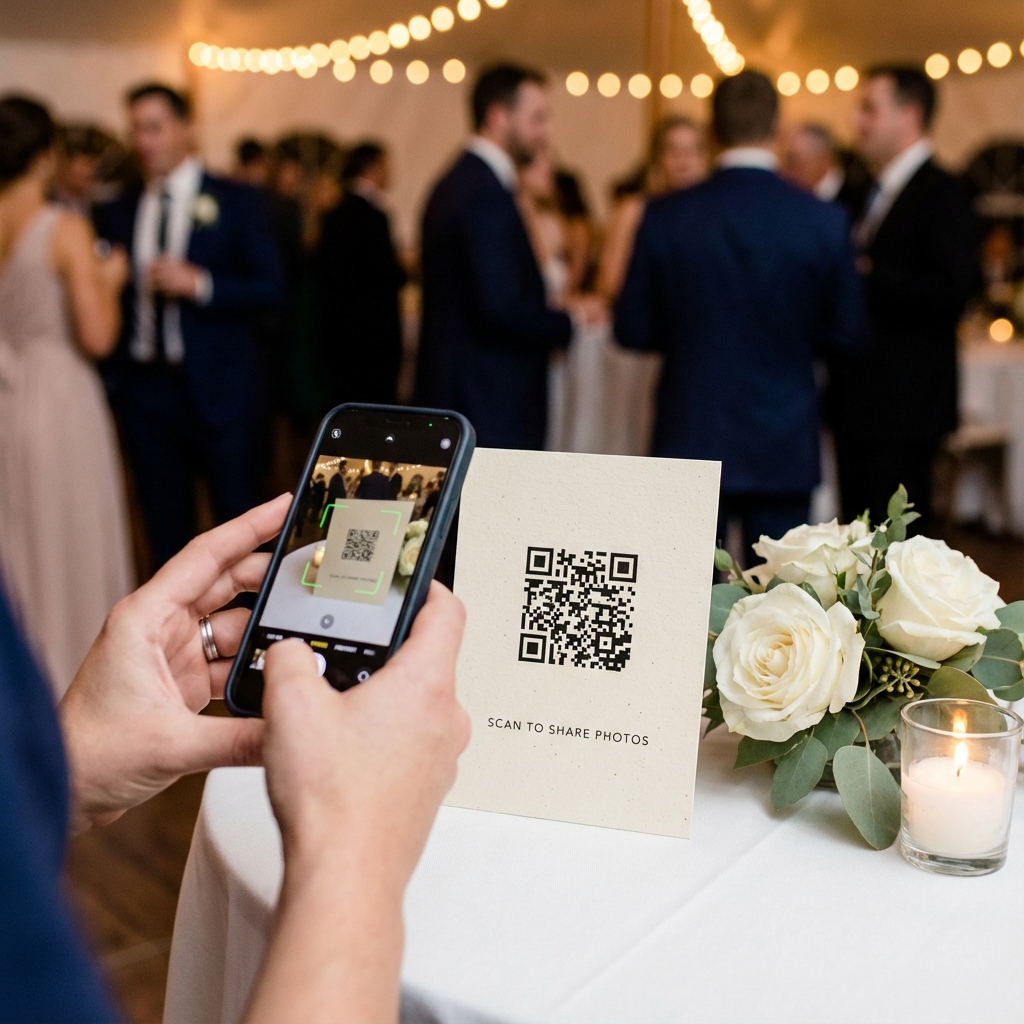










Social and People-Focused Challenges
6 challenges, dinner and speechesChallenges that get guests talking to each other, which helps plus-ones and anyone who only knows the couple.